News collected March-April

Since we haven’t posted that frequently during the beginning of this year I thought I’d summarize stuff that has passed through my internet channels the last two months.

EMAIL

News from Audiovisual City

Marco Savo from Audiovisual City updated me on what is going in Barcelona. They have just carried out BIT or not to BEAT which was the first in a series of audiovisual jam sessions. Check them out on Facebook.
AV City are also organizing an AV meeting in Barcelona together with Niu Espai d’art that takes part 7-9 of June. There will be two days of workshop and lectures and the last day will be dedicated to AV jam sessions and performances. The name will probably be AMB but there seems like there is some more decisions to be made so stay tuned for more info and links. The meeting will be held at the very cool industrial venue Fabra i Coats. It’s going to be interesting to see how they make it work with all the beams.
Marco also announced that an anthropologist from Australian National University named Saskia Lillepuu will follow AV City and wile working on her PhD. Her project is called “An anthropologic research on the AV culture”.

ExpressBox 3T

Magma announced the upcoming release of ExpressBox 3T, which is a box where you can insert PCI Express cards and connect to your mac via Thunderbolt. A good solution for people who cry over the PCI Express port being replaced with by the rather unnecessary SD card reader. You still need a computer new enough to have a Thunderbolt port.

AV Mixer pro update

James Cui a.k.a. VJ Fader announced AV Mixer Pro 2 for Mac & PC and a quick start guide


FROM OUR FACEBOOK GROUP

Using a DVD player for mapped video installation

Johannes Ferm Winkler (Winkelfilm) initiated a thread about using a DVD for a mapped video installation. Members were pointing the problem with locking down projector and projection objects so that they don’t move and also the issues with calibration of the video. It was also pointed out that it’s harder to edit for DVD and get the aspect ratio right and suggestions were made to use a digital signage player instead. Two models were listed: BrightSign HD110 (recommended on VJ Forums) and the Popcorn Hour S-210.

The Raspberry Pi


There has also been talk about the upcoming release of the $25 Raspberry Pi computer and what it could do for VJ-ing and audiovisual installations. Here are three useful links:
The Raspberry Pi web site, The Gertboard which is an expansion board for the Raspberry Pi that makes it possible to get sensor input and control motors, etc. And here’s an interesting list of side projects that expands the Raspberry Pi.

The first edition of the RPi doesn’t have a case and because of it’s size there aren’t any holes in the board to fix a case. Marco Alici has a solution to that problem. He has created a case that fits very tight and snaps together. It has air holes for cooling but there is still some space left to be able to fix the unit to another object with double adhesive tape. The case will be available at Shapeways for 3D printing on demand. The ironic part is that the case will be more expensive than the Raspberry Pi computer. It’s expected to cost just below $40.

Equipment running hot

Another interesting discussions was around Macbook Pros and other equipment running really hot during performances. Mattias Lindberg (Fake Pilot) got his MBP up to 99°C running VDMX. One culprit seemed to be the AIC video codec. It was also mentioned by Patrik Johansson (Nrlnd) that his external Blackmagic Ultrastudio was running so hot it left marks on the table. Another problem that has been pointed out by Patrik is that the Ultrastudio isn’t possible to daisy chain so you can’t digitize video and output video at the same time. Patrik recommended investing in the slightly more expensive IO XT box from AJA instead since it has double Thunderbolt ports.

VJ Booking

VJ Booking became members of our Facebook group and I’ve seen that a few Swedes (including myself) have created profiles. I don’t know how many VJs gets gigs from that site but it doesn’t hurt to put your name out on more sites on the net.


FROM VARIOUS TWITTER CONTACTS

Bicycle Midi controller

ElektricKingDan (from Startsladd) posted this video showing a bicycle midi controller that controls Traktor over Bluetooth.

Be sure to watch the making of video as well:

Bangnoise updates Sampler plugin

Bangnoise has updated his Quartz Composer Sampler plugin to version 2.

See how the plugin has been used by the Australian Dance Theatre.
http://www.youtube.com/watch?v=WTyuis1HLtU

TouchOSC updates

TouchOSC 1.8.1 + TouchOSC Editor 1.5.5 has been released.

Cool links from Synthetics

My buddy Ben Cook (Syntheics) tweeted about a great article from 1970’s synthesizer mag Synapse on the subject of .
He also retweeted Warp Records tweet about Squarepusher’s new LED video for “Dark Steering”.

The Vidiots finally launch a new site

We thought the Vidiots didn’t care about marketing, but after six years the Vidiots finally puts their one page site featuring a single animated gif to rest in favor of a new high striving black concept site. We get to see a whole retrospect of Vidiots videos from the early days to the mappings and the installations of the later days.

The new site has been long time coming. Vidiots member Leon Martinsen says: “We have had a couple of versions almost finished but we decided to scrap them at the last minute. The last attempt was a rather advanced Flash site. But the site lacked a practical backend for adding new posts and we thought we had painted ourselves into a corner using an obsolete technology”.

We asked Johan Holm about the black concept: “Everyone who knows me knows how much I love the color black, or “non-color” as I prefer to call it. I dress in black and I design with black as often as I can. I thought why not design a whole site in black, or well very dark gray, since you have to see a hint of the site against the black background. Black is stylish and timeless. And you know what they say, once you go black you never go back”.

Click on the image to view a larger version and do not have any direct light shining at the screen. You still have to squint at the image to see anything. Chances are, that if you have an uncalibrated monitor, you will not see more than the highlighted text against the totally black background.

Sid Visuals aka Christoffer Höring, the only guy in the group with an artist name, adds: “It’s about time we get something up there. It was a pain in the ass to recompress and reupload all videos since we needed a black poster frame and a fade-in for every video to go with the site.”

Regarding the black concept, Christoffer continues: ”Look at it as Earth Day but we decided not to turn the lights on again, it’s an environmental statement”.

Legibillity aside, it’s good to finally see the Vidiot’s body of work collected in one place. It’s a bit ironic that animated gifs have become hip again now when the Vidots lets go of their’s. Explore the site yourself: http://vidiots.se.

Stockholm’s most ambitious video mapping yet

This weekend Stockholm had it’s largest most ambitious facade mapping yet. I.R.I.S. is a 15 minute show by multi disciplinary artist Jesper Wachtmeister displayed on the face of the Stockholm City Museum. I was there for the Friday night premiere and I will share some clips I captured of what I think worked out well.

The different reflections of the surrounding environments was really nice and the spinning blocks of bricked wall looked good too. One of the most low tech parts was one of the most successful scenes, the drama happening in the windows (at nn:nn). It was shot in a studio with live characters behind frosted glass. We’ve seen moving blocks in video mappings over and over the last few years but the idea with the disrupted test image and the TV-ads (at nn:nn) was really nice.

The show was made in Softimage, Cinema 4D and After Effects. A D3, a Watchout video server and 3 stacked 20.000 ansi lumen Barco projectors were used to display the video on the facade. I thought the alignment of the projectors was off for the premier night causing the image to look a bit unsharp. I hope that was fixed for the saturday and sunday performance, it kind of bugged me… a lot.

The 3D scenes were created by Christian Köhler and David Enbom. I will post a better video when the documentation is available from the artists. More info here: solarisfilm.se/iris/

Processing for iOS

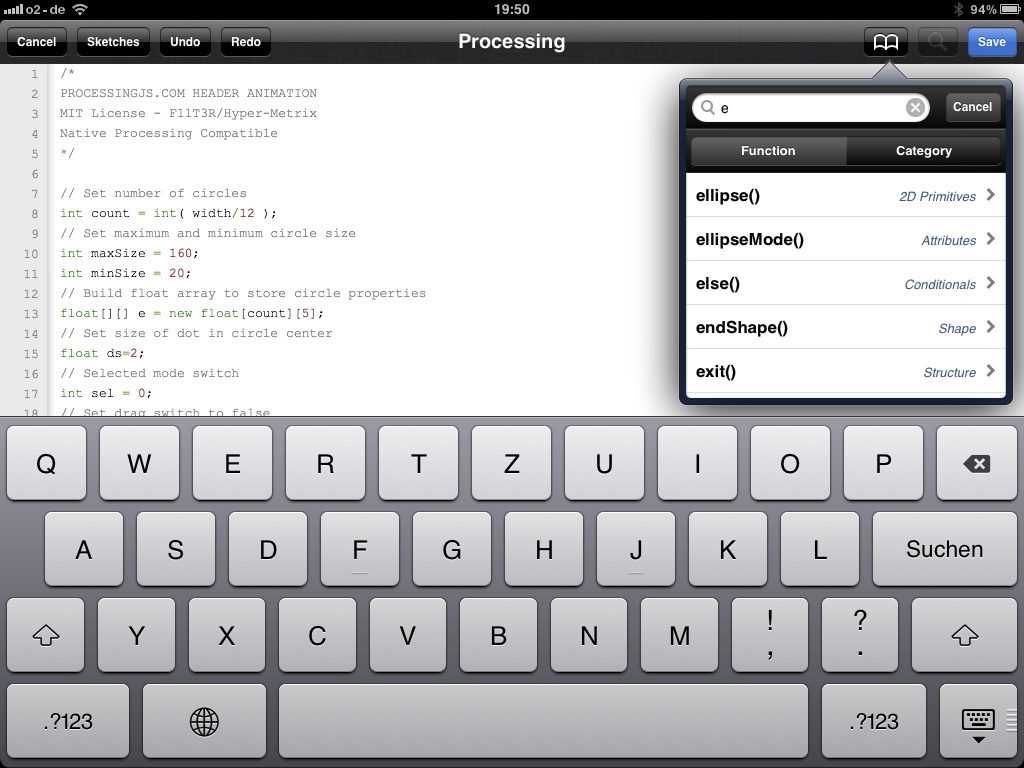
I got really excited when I heard about PR0C3551IN6, an app for iPad, iPhone and iPod Touch that will let you code and run Processing sketches. You can import/export your files via iTunes and the video output can be mirrored to a second screen if you have an iPad2. If things goes according to plans, there will be video output even for the iPad1 in a future release. The app will be released within the next few weeks. Read more about what this app can and can’t do on the project web site.

http://vimeo.com/26383732
Another Processing related thing I ran across on Twitter this week (via @h3xl3r) was the concept for a Processing iPad magazine called Void by Nathalie Hanke. It would be really cool to see Hanke realizing this project, maybe with the support of Audiocommander. Read more about Void here.


More software updates

Just Add Music has been updated to 2.6.

  • New video play back engine
  • New clip loader/scanner
  • New control surface script
  • OSX 10.6 and OSX 10.7 fixes
  • Fullscreen fix
  • Added example Ableton live set
  • Syphon fixes

Like Just Add Music on their Facebook page to download a trail version.

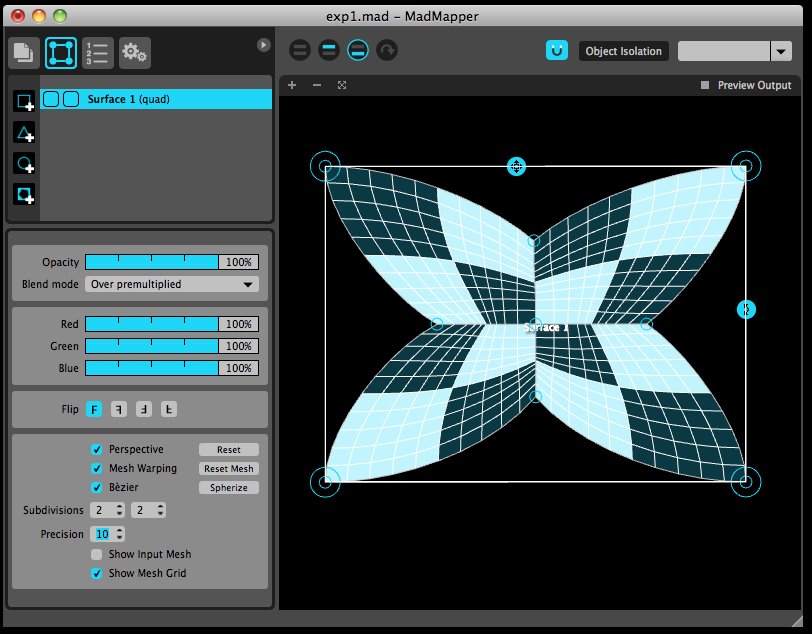
Garagecube has just announced MadMapper 1.1 Release Candidate 1. It’s is available for download for registered users. There are several new features and some bug fixes here are some highlights:

  • Syphon is upgraded for better performance and Syphon output has been added
  • Improved quads
  • Mask primitive invert option
  • New DMX fixture setup

Read all about all new functions and fixes in this Garagecube forum post.

The year starts strong with new releases

Software updates December 2011

There has been a few notable software updates the last week.

Coge 1.2 with Christmas offer

CoGe is one of the VJ softwares I’ve been keeping my eyes on since it has been developing very rapidly, especially since it went commercial.
The news for version 1.2 includes:

  • Major increase of performance – Up to 80% increase in playback of HD files and layer blending.
  • Renaming gadgets – If you have several gadgets of the same kind, you can now rename them to keep things in a neat order.
  • MIDI and OSC sending with Buttons and Sliders – They can now talk back to your MIDI and OSC able devices.
  • Layer Groups – A new gadget for grouping layers. A layer group can also be sent over Syphon.
  • Auto Player Select – This makes it easier to play different kinds of media files.

CoGe has a 20% christmas discount until January 5th. That should mean a low $79. Read more about it on the CoGe blog.


Resolume Avenue 4 and Resolume Arena 4 has now been released for Windows and OSX

These are the news for Resolume 4 (didn’t some of them exist in version 3 already?):

  • Audiovisual Playback
  • Generative Content with the help of Flash, Quartz Composer compositions and FreeFrame GL plugins.
  • Audiovisual Effects with VST and FreeFrame plugins.
  • 3D OpenGL Accelerated Compositing – position, scale and rotate clips, layers or the entire composition.
  • Global BPM tempo – everything can be linked to the global tempo.
  • MIDI & OSC – In both directions, so Resolume can talk back to your MIDI and OSC abled devices.
  • Auto pilot – Play clips in sequence or in random order while you go to the bar.
  • Clip transitions – Automagically fade between clips.
  • Native Blackmagic Capture Support – All BlackMagic cards are supported out of the box on both Windows and OSX.
  • Audio Analysis – FFT analysis to make any parameter bounce to the music.
  • Crossfader – Assign any layer to the A or B bus of the crossfader and mix DJ style with audio and video.
  • Output and Preview Monitors – Preview clips and layers.
  • Language support – the Resolume interface is available in Català, Deutsch, English, Español, Français, Haags, Italiano, Magyar, Nederlands and Português.

Arena 4 is basically Avenue 4 with some added advanced features

  • Screen warping & video mapping – Slice and transform your composition to your liking with the help of bezier tools (even curved beziers).
  • Soft Edge – Create seemless widescreen projections with two or more projectors.
  • SMPTE Timecode Input – Sync your composition with lights, lasers, fireworks, etc.
  • DMX Input – Control Arena from a DMX light desk. Input can be done via ArtNet or an Enttec DMX USB Pro.

Plus several more smaller news and enhancements, read it all on the Resolume site.
The pricing confuses me a bit but there is a rebate until January 1st and there is also a generous 50% educational discount.


TouchVizz VJ app for iPad2 and TouchOSC updates

Hexler has been keeping busy. They recently released a VJ app for iPad called TouchVizz. You will need the power of an iPad 2 to be able to run the it.

Here’s the pretty impressing feature list:

  • Import up to 125 videos into your set via iTunes File Sharing or from the iPad’s library.
  • Playback and mix two channels of video with independent playback speed control.
  • Display the output on an external screen or projector using any iPad-compatible video-out adapter.
  • Use the iPad’s front and back-facing cameras as input to integrate live footage into your set.
  • Apply one of 17 effect filters to each channel and the master output.
  • Control effect parameters using the multi-touch enabled preview area.
  • Preview the output in full-screen on the iPad.
  • Save and load your set to recall, backup or transfer sets between iPads using iTunes File SharingConfigure the interface layout to your preference.
  • 10 demo clips by hexler and pixeldelay included.
  • CoreMIDI support allows full control of TouchViZ wirelessly using OS X CoreMIDI Network sessions, using iPad MIDI interfaces such as iRig MIDI, iConnectMIDI, MIDI Mobilizer II, Yamaha i-MX1, or by connecting a compatible USB MIDI-controller using the iPad Camera Connection Kit.
  • Open Sound Control support allows full control of TouchViZ over WiFi from any application that supports OSC such as Max/MSP, PureData, Max4Live, TouchOSC and others
  • Built on the latest iOS 5 and OpenGL ES 2.0 technology

Hexler has also released an 1.8 update of TouchOSC including a little software called MIDI Bride

First the list of update and fixes in TouchOSC version 1.8:

  • Added MIDI Bridge connection
  • Toggle button behavior problems fixed
  • OSC Network connection and Bonjour advertising now enabled at application start-up
  • New layout: Jog-On for NI Traktor by digitaldjtools.net
  • New layouts: ViZPad and ViZPod for TouchViZ

At fist I thought the idea of an a MIDI bridge software sounded silly since TouchOSC already sends MIDI over Apple’s CoreMIDI. But Rob at Hexler was kind to let me know that the software was foremost made for Windows user who doesn’t have an easy way of connecting to TouchOSC over MIDI. So for Windows users this is a really simple “plug & play” package that doesn’t need any other MIDI drivers.
It was so easy to make a version for OSX that Rob thought “why not”. But it also solves a problem that many users were having where they need to re-establish the CoreMIDI connection when restarting the TouchOSC app, which of course is less ideal during a live performance. With MIDI Bridge the connection will be automatically restored.

The upcoming version of TouchOSC for Android will support the MIDI Bridge as well.

Go to the Hexler site for more info and downloads.

Two new tutorials

I’ve made two new Modul8 tutorials. The latest one covers a question that I get asked very often, how to animate still images and videos to the beat (bpm) in Modul8:

The other tutorial teaches you how to connect TouchOSC with Modul8 over Core MIDI with MIDI feedback. It was made in conjunction to one of my workshops at the audiovisual program at the University of Dalarna:

I’ve also launched a Vimeo channel for my tutorials at vimeo.com/channels/tmttutorials.